Flutter Ads SDK Docs
Customizable Native Ads for Mobile, Desktop & Web Flutter Apps
Fully customizable native ads for Flutter applications with flexible layouts, responsive media, and seamless UI integration across mobile, web, and desktop platforms.
Flutter Native Ads Example
Learn how to integrate fully customizable native ads using Flutter Ads SDK with flexible layouts, media rendering, and CTA components.
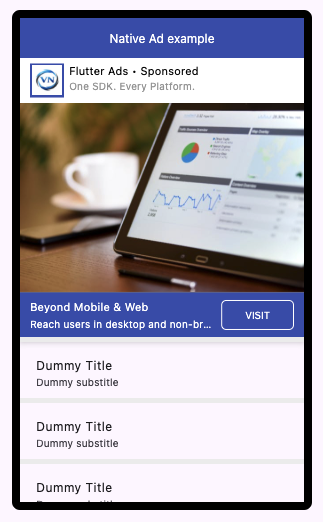
Native Ad Preview
Fully Customizable Ads
Flexible layouts & higher engagement
Native ads allow developers to fully customize layout, media, typography, and call-to-action components while preserving a seamless application experience.
1
Ensure Ads Available
Ensure Native ads are available before rendering.
main.dart
await FlutterAds.instance.ensureAdsAvailable(
  adType: AdType.native,
  context: context,
);
2
Render Native Ads
Render ads using standard or conditional widget rendering methods.
main.dart
FlutterAds.instance.getNativeAdWidget(
  placeholderWidget: const SizedBox(height: 60),
  testMode: true,
  heightConstraint: MaxHeightConstraint(400),
  styling: NativeAdStylingModel(),
);

FlutterAds.instance.maybeGetNativeAdWidget(
  placeholderWidget: const SizedBox(height: 60),
  testMode: true,
  heightConstraint: MaxHeightConstraint(400),
  styling: NativeAdStylingModel(),
);
3
Customize Styling
Customize layout, typography, media, and CTA appearance using the styling model.
main.dart
NativeAdStylingModel(
  logoSize: 30,
  logoBackgroundColor: Theme.of(context).primaryColor,
  descriptionStyle: const TextStyle(
    color: Colors.black,
    fontSize: 12,
  ),
)
Native ad best practices
- • Match ads with your application design system
- • Keep CTA elements clearly visible
- • Maintain distinction between ads and organic content