Flutter Ads SDK Docs
Lightweight Mini Native Ads for Mobile, Desktop & Web Flutter Apps
Lightweight inline native ads optimized for feeds, lists, and high-performance Flutter applications with seamless UI integration.
Flutter Mini Native Ads Example
Learn how to integrate compact inline native ads inside Flutter feeds, lists, and content layouts using Flutter Ads SDK.
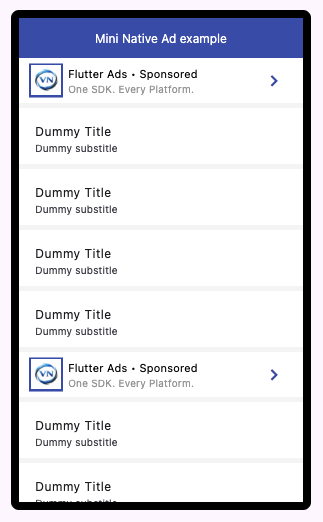
Mini Native Ad Preview
Lightweight Native Ads
Seamless inline monetization
Mini Native ads are compact ad units designed to blend naturally within Flutter content while maintaining high rendering performance and better user experience.
1
Ensure Ads Available
Ensure Mini Native ads are available before rendering.
main.dart
await FlutterAds.instance.ensureAdsAvailable(
  adType: AdType.miniNative,
  context: context,
);
2
Render Ad Widgets
Render Mini Native ads using standard or conditional widget rendering.
main.dart
FlutterAds.instance.getMiniNativeAdWidget(
  placeholderWidget: const SizedBox(height: 60),
  testMode: true,
  styling: MiniNativeAdStylingModel(),
);

FlutterAds.instance.maybeGetMiniNativeAdWidget(
  placeholderWidget: const SizedBox(height: 60),
  testMode: true,
  styling: MiniNativeAdStylingModel(),
);
3
Customize Styling
Customize Mini Native ads using the styling model.
main.dart
MiniNativeAdStylingModel(
  logoSize: 30,
  elevation: 0,
  tileStyle: AdListTileStyle(
    tileHeight: 45,
    tileColor: Colors.white,
  ),
)
Best placement strategy
- • Use Mini Native ads inside feeds and lists
- • Blend ads naturally with surrounding content
- • Keep layouts lightweight for best performance